

最好先自己装一下git和python的环境
Python version: 3.12.6
配置环境变量
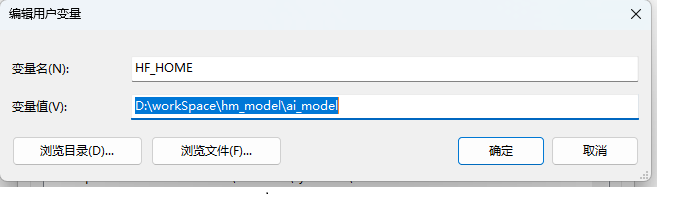
HF_HOME
D:\workSpace\hm_model\ai_model
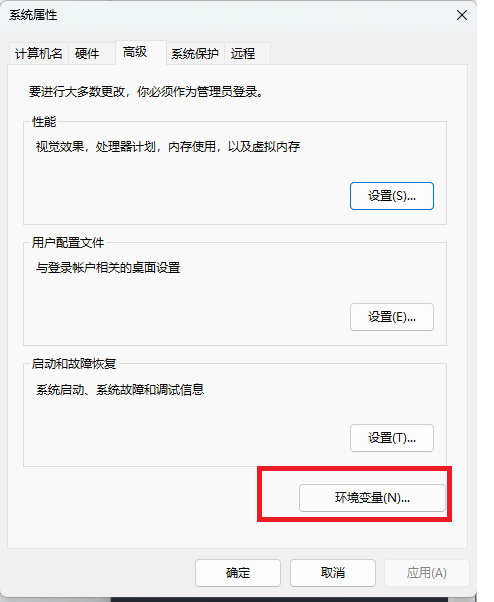
- 推荐使用快捷键键盘上的窗户一样的键,在ctrl右侧 win+s 搜索框输入 “bianji”
- 在用户变量下新建 key输入HF_HOME value输入你想要放模型的位置
- 点击保存保存,一直到所有窗口全部退出! 最好重启一下电脑
下载zip的压缩文件放到你喜欢的位置
zip下载链接
https://app.koofr.net/links/8aea94a8-fd53-43a9-9740-7598e91ab4d9
密码: alun123
一切安装完毕后虚环境占用空间6个G
解压以后目录如下
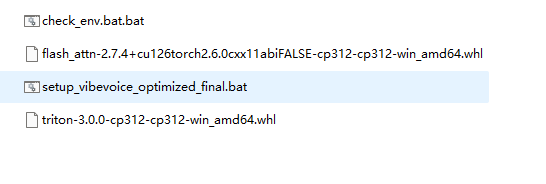
setup_vibevoice_optimized_final.bat的脚本文件编辑
- triton-3.0.0-cp312-cp312-win_amd64.whl
- flash_attn-2.7.4+cu126torch2.6.0cxx11abiFALSE-cp312-cp312-win_amd64.whl
- 将脚本中以上两个文件的位置改成你自己的位置,使用绝对路径路径如脚本中我的位置在E盘:
- 如果是16g的显卡 在脚本的最后一行更换模型 为:microsoft/VibeVoice-1.5B –share
  E:\youtube_blog\pythonWork\flash_attn-2.7.4+cu126torch2.6.0cxx11abiFALSE-cp312-cp312-win_amd64.whl

  E:\youtube_blog\pythonWork\triton-3.0.0-cp312-cp312-win_amd64.whl
@echo off
rem Check if Python is installed
python --version >nul 2>&1
if errorlevel 1 (
echo Python not installed, starting installation...
powershell -Command "Start-Process msiexec.exe -Wait -ArgumentList '/i https://www.python.org/ftp/python/3.12.0/python-3.12.0-amd64.exe /quiet InstallAllUsers=1 PrependPath=1'"
) else (
echo Python is already installed
)
rem Create virtual environment pyVibeVoiceEnv
echo Creating virtual environment...
python -m venv pyVibeVoiceEnv
rem Check if Git is installed
where git >nul 2>&1
if errorlevel 1 (
echo Git not installed, starting installation...
powershell -Command "Start-Process msiexec.exe -Wait -ArgumentList '/i https://github.com/git-for-windows/git/releases/download/v2.41.0.windows.1/Git-2.41.0-64-bit.exe /quiet'"
) else (
echo Git is already installed
)
rem Clone VibeVoice repository
if not exist VibeVoice (
echo Cloning VibeVoice repository...
git clone https://github.com/microsoft/VibeVoice.git
if errorlevel 1 (
echo Clone failed, please check network connection or git configuration.
exit /b 1
)
)
rem Change to project directory
cd /d %cd%\VibeVoice
echo.
echo =============================================
echo ENVIRONMENT VERIFICATION:
echo =============================================
echo Python executable path:
..
pyVibeVoiceEnv\Scripts\python.exe -c "import sys; print(sys.executable)"
echo.
echo Python environment prefix:
..
pyVibeVoiceEnv\Scripts\python.exe -c "import sys; print('Virtual Env:', sys.prefix)"
echo.
echo Pip executable path:
where ..\pyVibeVoiceEnv\Scripts\pip.exe
echo.
echo Virtual environment packages location:
..
pyVibeVoiceEnv\Scripts\python.exe -c "import site; print('Packages:', site.getsitepackages())"
echo =============================================
echo.
rem Install PyTorch, Torchvision, and Torchaudio with CUDA support into the virtual environment
echo Installing PyTorch, Torchvision, Torchaudio with CUDA support...
"%cd%\..\pyVibeVoiceEnv\Scripts\pip.exe" install torch==2.6.0 torchvision torchaudio --index-url https://download.pytorch.org/whl/cu126
echo.
rem Install flash-attn in the virtual environment
echo Installing flash-attn...
"%cd%\..\pyVibeVoiceEnv\Scripts\pip.exe" install
<!--这里替换成你的路径 -->
E:\youtube_blog\pythonWork\flash_attn-2.7.4+cu126torch2.6.0cxx11abiFALSE-cp312-cp312-win_amd64.whl
echo.
echo Installing triton
"%cd%\..\pyVibeVoiceEnv\Scripts\pip.exe" install
<!--这里替换成你的路径 -->
E:\youtube_blog\pythonWork\triton-3.0.0-cp312-cp312-win_amd64.whl
echo.
rem Verify installed packages
echo Verifying installed packages...
..
pyVibeVoiceEnv\Scripts\pip.exe list
rem Run Gradio demo using virtual environment's python directly
echo.
echo Starting Gradio demo with virtual environment...
"%cd%\..\pyVibeVoiceEnv\Scripts\python.exe" demo\gradio_demo.py --model_path WestZhang/VibeVoice-Large-pt --share
<!--如果是16g的显卡更换模型 为:microsoft/VibeVoice-1.5B --share -->
pause